US Compliance · FDA Nutrition Facts

FDA Nutrition Facts label software

Generate an FDA-format Nutrition Facts panel straight from your recipes — with a % Daily Value column, Trans Fat, Cholesterol and Added Sugars, servings per container and the 2,000-calorie footnote.

Start free trial → US compliance overview

7-day free trial · no card required · Essentials $19/mo equivalent

Building a Nutrition Facts panel by hand is fiddly and easy to get wrong. You have to find Daily Value references, work out percentages for every nutrient, remember the newer lines like Added Sugars, and lay it all out to look like the FDA panel. FoodCore does the calculation and the layout for you: as an FDA nutrition facts label generator, it turns the recipe you already have into an FDA-format panel.

When your account’s Compliance Region is set to United States (or Both), every recipe gains an FDA-format Nutrition Facts panel on both the recipe view and the printable label. FDA-specific inputs — Trans Fat, Cholesterol and Added Sugars — are captured per ingredient and rolled up automatically, and Sodium is auto-derived from the salt in your recipe. The % Daily Value column is calculated against the FDA reference values in 21 CFR 101.9.

An honest note on accuracy. FoodCore produces an FDA-FORMAT panel with % Daily Values; it uses standard rounding, not the FDA’s exact incremental rounding rules, so it is a strong structured draft you review against the regulation rather than a guaranteed-validated label. Micronutrients in the footer (Vitamin D, Calcium, Iron, Potassium) appear as placeholders unless you supply per-ingredient lab values. We would rather tell you that up front than over-promise. For the regulatory background, see our FDA Nutrition Facts requirements guide.

This page is part of FoodCore’s US toolkit alongside FALCPA allergen labeling software and US food labeling software, all controlled from the one Compliance Region setting described on the US compliance software hub.

What the FDA Nutrition Facts software does

Calculated from your recipe data, laid out in the FDA panel format.

FDA-format panel

Calories; Total Fat with Saturated Fat and Trans Fat; Cholesterol; Sodium; Total Carbohydrate with Dietary Fiber, Total Sugars and Includes Added Sugars; Protein; plus the Vitamin D, Calcium, Iron, Potassium footer — in the standard FDA layout.

% Daily Value column

Percentages calculated against the FDA reference Daily Values in 21 CFR 101.9 (Total Fat 78g, Saturated Fat 20g, Cholesterol 300mg, Sodium 2,300mg, Total Carbohydrate 275g, Fiber 28g, Added Sugars 50g), with the 2,000-calorie footnote.

Trans Fat, Cholesterol & Added Sugars

These FDA-specific inputs are captured per ingredient and rolled up automatically to the recipe. They appear only on US and Both accounts, so UK labels stay clean.

Servings & serving size header

The panel shows “X servings per container” and a “Serving size” header, matching the structure of the modern FDA Nutrition Facts label.

Sodium from salt

Sodium is auto-derived from the salt content in your recipe data, so you maintain one figure and the panel does the conversion.

On screen and on the label

The panel appears on the recipe view for review and on the printable label for output — no exporting to another tool to lay it out.
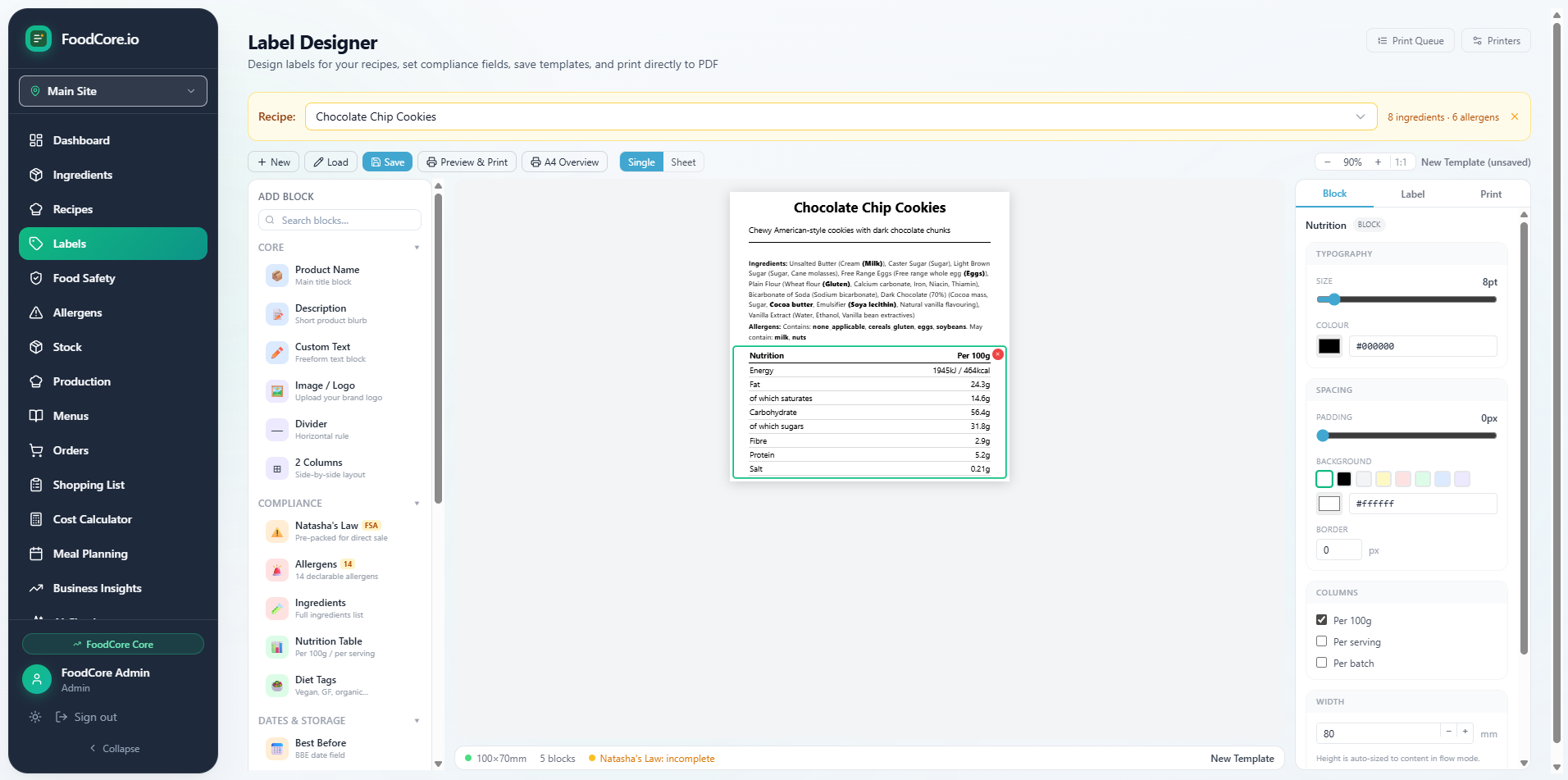
FoodCore label designer interface

FoodCore’s label designer, where the printable label is produced.

What the panel shows

Every line FoodCore renders in the FDA-format Nutrition Facts panel.

  • “X servings per container” and “Serving size” header
  • Calories
  • Total Fat → Saturated Fat, Trans Fat
  • Cholesterol
  • Sodium (auto-derived from salt)
  • Total Carbohydrate → Dietary Fiber, Total Sugars, Includes _g Added Sugars
  • Protein
  • Vitamin D, Calcium, Iron, Potassium footer (placeholders unless per-ingredient lab values are supplied)
  • % Daily Value column vs FDA reference DVs (21 CFR 101.9)
  • Footnote: “Percent Daily Values are based on a 2,000 calorie diet.”

FoodCore vs Word / manual panels

Why producers stop building Nutrition Facts panels by hand.

Task Word / manual FoodCore
% Daily Value calculation✗ Look up & calculate each one✓ Calculated vs 21 CFR 101.9
Trans Fat / Cholesterol / Added Sugars✗ Easy to omit✓ Captured per ingredient, rolled up
Panel layout✗ Built by hand each time✓ FDA-format, automatic
Updates when recipe changes✗ Redo manually✓ Recalculates automatically
Rounding✗ Manual, inconsistentStandard rounding (not FDA incremental)

FoodCore uses standard rounding rather than the FDA’s exact incremental rounding rules — review the panel against the regulation before final print.

Who it's for

Anyone who needs a Nutrition Facts panel without a lab quote for every recipe.

Packaged-food makers

Produce an FDA-format panel for each SKU from the recipe you already maintain.

US bakeries & cottage food

Get a clean, structured Nutrition Facts draft for cookies, breads and bars without manual math.

Exporters (UK → US)

Add an FDA panel alongside your existing UK information using Both mode.

Caterers & meal prep

Keep nutrition information consistent across a large, changing US menu.

Common questions

Can FoodCore generate an FDA Nutrition Facts label?

Yes. On US (or Both) accounts FoodCore produces an FDA-format Nutrition Facts panel directly from your recipe. It shows Calories; Total Fat with Saturated Fat and Trans Fat; Cholesterol; Sodium; Total Carbohydrate with Dietary Fiber, Total Sugars and Includes Added Sugars; Protein; and a Vitamin D, Calcium, Iron and Potassium footer, with a % Daily Value column, servings per container, a serving size header and the 2,000-calorie footnote.

Is this fully FDA-validated?

No, and we will not claim it is. FoodCore generates an FDA-FORMAT Nutrition Facts panel with % Daily Values calculated against the FDA reference values in 21 CFR 101.9. It uses standard rounding, NOT the FDA's exact incremental rounding rules. Treat the output as a strong, structured starting point you review against the regulation, not as a guaranteed-validated label. The AI compliance assistant is AI-assisted guidance, not legal advice.

How are Trans Fat, Cholesterol and Added Sugars handled?

These FDA-specific inputs are captured per ingredient, then rolled up automatically to the recipe and shown on the panel. They appear only on US and Both accounts. If you do not enter a value for an ingredient, it simply contributes zero for that nutrient.

What % Daily Values does FoodCore use?

The % Daily Value column is calculated against the FDA reference Daily Values in 21 CFR 101.9 — for example Total Fat 78g, Saturated Fat 20g, Cholesterol 300mg, Sodium 2,300mg, Total Carbohydrate 275g, Dietary Fiber 28g and Added Sugars 50g — with the footnote 'Percent Daily Values are based on a 2,000 calorie diet.'

Does it calculate Vitamin D, Calcium, Iron and Potassium?

The panel shows the Vitamin D, Calcium, Iron and Potassium footer, but these micronutrients are placeholders unless you supply per-ingredient lab values. FoodCore does not invent micronutrient figures — if you have certificate-of-analysis or lab data for an ingredient, enter it and the footer reflects it.

Where does the Sodium figure come from?

Sodium is auto-derived from the salt content in your recipe data, so you do not have to maintain a separate sodium field. As with all values, review the result before printing a final label.

Can I print the Nutrition Facts panel?

Yes. The FDA-format panel appears on the recipe view and on the printable label, so you can review it on screen and print it as part of your product label.

How much does it cost?

FoodCore Essentials is $19/mo equivalent (£19) and Core is £55/mo, both with a 7-day free trial and no card required. Sign up at signup.foodcore.io.

Related US features & guides

US compliance software →FALCPA allergen labeling →US food labeling software →Product overview →FDA Nutrition Facts requirements →

Try FoodCore free for 7 days

Every feature included. No card required. Cancel any time. Essentials from $19/mo equivalent — two plans, one Compliance Region switch.

Start free trial →

Questions? Contact us or find us on Instagram.