Kitchen Labelling Software · UK

Kitchen labelling software for prep, date and Natasha’s Law labels

FoodCore prints the labels a kitchen actually uses — prep and day-dot labels for the walk-in, use-by dates worked out from each recipe’s shelf life, and PPDS labels with allergens in bold — all from the same recipes. Print from your phone to an AirPrint or Android printer, or as a PDF. On every plan, from £25/month.

Start free trial → Food labelling software

7-day free trial · no card required · from £25/mo after

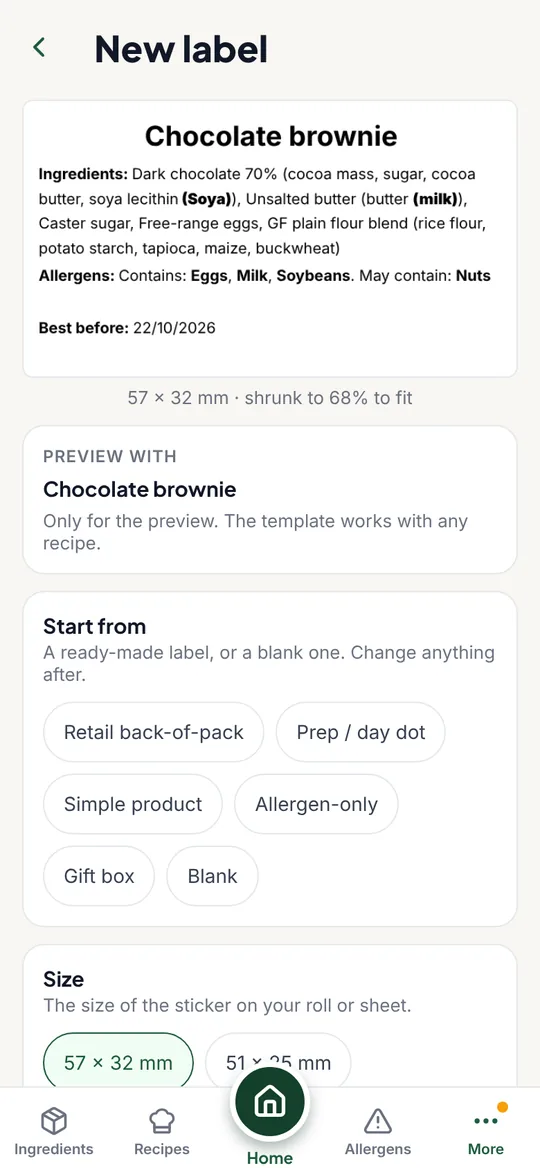
Label printing in the FoodCore web appMaking a new label in the FoodCore app: a live preview, ready-made starting points and the sticker size

The web app on your laptop, the mobile app on your phone — one account.

Download on the App StoreGet it on Google PlayFree app for iPhone and Android · try it on your phone, no account needed

Most kitchens label in two places. In the walk-in and on the prep shelves there are prep labels and day dots: what the container holds, when it was made and when it has to be used by. On food that goes out to customers pre-packed there are Natasha’s Law labels, with the full ingredients list and the allergens emphasised. In a lot of small kitchens both are still written by hand, from memory, at the end of a busy shift.

Handwritten labels fail in predictable ways. The date is worked out in someone’s head, the writing is hard to read by Thursday, and the allergen knowledge lives with whoever made the batch. When a supplier changes a product, nobody’s marker pen knows about it. If you are doing handwritten prep labels and losing track of allergens, the fix is not a neater pen: it is printing the label from the recipe, so the allergens and the date come from records instead of memory.

That is what kitchen labelling software is for. FoodCore is kitchen management software for small UK food businesses, and labels, allergens, shelf life and automatic date labels are on every plan, starting with Essentials at £25 a month. You print from the phone in your pocket or the laptop in the office. There is no special terminal to buy.

What FoodCore prints for your kitchen

Three kinds of label from one set of recipes, so the prep shelf and the shop counter never disagree.

Prep and day-dot labels

A small label for the container: the item, the date it was made and the date to use it by, in the same printed layout every time so anyone on the team can read it at a glance. Make the template once and reuse it every shift.

Use-by and best-before from shelf life

Set a shelf life on each recipe once and FoodCore fills in the date when you print. You decide the shelf life from your own knowledge, records and testing where needed; FoodCore does the date arithmetic, not the food safety decision.

Natasha’s Law PPDS labels

The name of the food, the full ingredients list in descending order of weight with compound ingredients broken down, and every one of the 14 allergens emphasised in bold. Built from the recipe, so the label changes when the recipe does.

Allergens tracked from ingredients

Allergens are recorded on each ingredient from the supplier’s specification and carried into every recipe and sub-recipe that uses it. Change an ingredient’s allergens and every recipe and label that uses it updates.

Templates and sticker sizes

The label builder in the app shows a live preview, gives you ready-made starting points and lets you set the sticker size, so a small prep label and a full back-of-pack label each come out the right shape.

Print from your phone, even offline

Pick a recipe and a template and print to an AirPrint printer from an iPhone or iPad, to any printer Android can print to, or save a PDF. The app keeps working with no signal, so the walk-in or a market stall is no problem.

Kitchen labelling machine, or kitchen labelling software?

Search for a kitchen labelling machine and you will mostly find dedicated units: a touchscreen and a printer in one box, usually sold with a subscription on top. FoodCore is not one of those. It is software, and FoodCore does not sell label printers or any other hardware. Instead it uses devices you probably already have:

Direct support for Bluetooth label printers is on the way, so check the FoodCore app page for the current list before buying one specially. Keeping the software separate from the printer has a practical upside: the printer is replaceable. If it breaks, print from another one, and your recipes, allergens and templates are untouched.

How much does a commercial kitchen labelling system cost to run?

The honest answer is that a kitchen labelling system is three costs, not one, and only one of them is FoodCore’s.

Every plan starts with a 7-day free trial with every feature unlocked and no card required, so you can print real labels on your own printer before paying anything. Full details are on the pricing page.

Labels across more than one kitchen

Core (£65 a month) includes team logins with per-feature permissions and more than one site. Staff sign in as themselves, see what their role allows and switch between sites in the app. On Essentials or Growth you can add Team logins & multi-site as a bolt-on for £10 a month.

If you want temperature records next to your labels, food safety — daily due diligence checks, temperature logs, corrective actions and a dated inspection pack — is on Core or a £12-a-month bolt-on. Fridge and freezer readings are entered in the app at the fridge, and an out-of-range reading asks what was done about it. FoodCore does not sell temperature probes or sensors.

FoodCore is built for food businesses with roughly 1–15 staff. A large hospitality group that needs central procurement or EDI will be better served by an enterprise system.

From handwritten to printed: a labelling workflow

How a small kitchen moves its labels onto FoodCore.

1
Add your ingredients with their allergens

Take allergens from each supplier’s specification, not from memory, and record “may contain” only where your own risk assessment has found a real risk of cross-contamination.

2
Build your recipes and set a shelf life

Add ingredients with quantities, including sub-recipes such as sauces and dressings. Set the shelf life you have decided for each recipe.

3
Make two templates

A small prep label for the walk-in, and a pack label for anything you sell pre-packed. Set the sticker size for each.

4
Print at the end of each prep or bake

Pick the recipe and the template and print from the phone. Dates and allergens fill themselves in.

5
Review when a supplier changes

A supplier reformulating a product is the most common way a correct record becomes wrong. Update the ingredient once and every recipe and label that uses it follows.

Handwritten labels vs FoodCore

What changes when the label comes from the recipe.

HandwrittenFoodCore
Allergens on the label✗ From memory✓ From the ingredient records
Use-by date✗ Worked out by hand✓ Filled in from the recipe’s shelf life
Legibility✗ Depends on the writer✓ The same printed layout every time
When a recipe changes✗ Every label rewritten✓ The label follows the recipe
PPDS ingredients list✗ Typed or written out✓ Weight order and allergen emphasis built in
HardwarePen and stickersA printer you choose — FoodCore sells none

Common questions

What is kitchen labelling software?

Software that prints the labels a kitchen uses — prep labels, day dots, use-by dates and labels for pre-packed food — from stored recipes instead of handwriting. In FoodCore the allergens come from your ingredient records and the dates come from each recipe’s shelf life. Labels, allergens, shelf life and automatic date labels are on every plan, from £25 a month.

Does FoodCore sell a kitchen labelling machine or label printer?

No. FoodCore is software only and sells no hardware. It prints from an iPhone or iPad to any AirPrint printer, from Android to any printer Android can print to, or as a PDF you can print on the printer you already have.

How much does a commercial kitchen label printer cost?

We don’t sell label printers, so we don’t quote prices: they vary by type and retailer, and you may already own a printer that works. FoodCore’s own cost is the subscription. Essentials is £25 a month and includes labels, allergens, shelf life and automatic date labels, with a 7-day free trial and no card required.

Can FoodCore print Natasha’s Law compliant labels in a kitchen?

Yes. FoodCore prints PPDS labels with the name of the food, the full ingredients list in descending order of weight and every one of the 14 allergens emphasised in bold, built from your recipes. The label is only as accurate as the ingredient records you enter, and allergen accuracy stays your legal responsibility.

Does FoodCore print prep labels and day-dot labels?

Yes. Make a prep label template with the item, the date it was made and its use-by date, and print it whenever you prep. Shelf life and automatic date labels are included on every plan.

How does FoodCore work out use-by dates?

From the shelf life you set on each recipe. You decide that shelf life from your own knowledge, records and, where needed, testing, and record how you decided as part of your food safety procedures. FoodCore then fills the date in when you print.

Can I use FoodCore labels across several kitchens?

Yes, on Core (£65 a month), which includes multi-site and team logins with per-feature permissions. On Essentials or Growth, Team logins & multi-site is a bolt-on at £10 a month.

Does label printing work without signal?

Yes. The FoodCore app keeps working with no signal, including printing labels, and syncs your changes when you are back online.

Related features & guides

Food labelling software →Food label maker →Natasha’s Law labels →PPDS label software →Allergen menu software →Use by vs best before →How to make your own food label →The FoodCore app →

Print your first kitchen labels free

Seven days with every feature, no card required. Labels, allergens and date labels on every plan from £25/month after the trial.

Start free trial →

Questions? Contact us or find us on Instagram.